Not DJ software plugins
These companions do not install inside Serato, rekordbox, or djay. They are optional ways to manage your PlayThis.Live queue from glasses or your Mac.


Free add-ons for DJs
PlayThis.Live works in the browser. Add Glasses HUD or Mac Menu Bar when you want requests on another screen — same account, same queue, no extra cost.
Included on Free and Pro. Always synced with the web app.
These companions do not install inside Serato, rekordbox, or djay. They are optional ways to manage your PlayThis.Live queue from glasses or your Mac.
Sign in once. Approve or reject from the web app, your glasses, or your menu bar — everything stays in sync.
Choose the companion that fits how you DJ. You can use one, both, or neither.
See requests without looking down
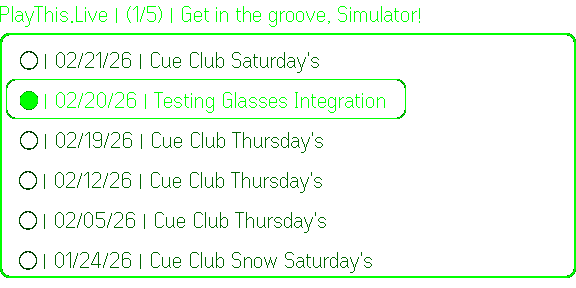
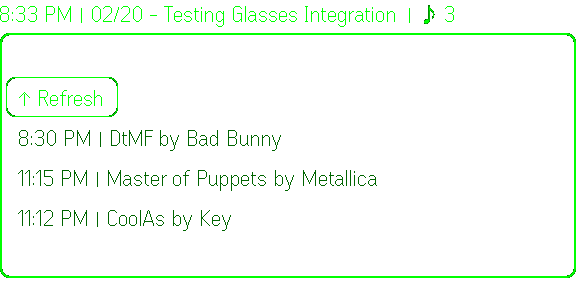
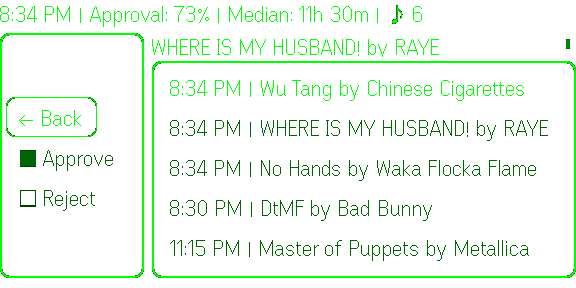
Incoming song requests appear on your glasses display. Tap to browse, double-tap to approve or reject — stay focused on the crowd, not your laptop.
Best for: DJs with Even G2 smart glasses
Get started
Download the Even Realities app first:



On your G2 display
On your Mac
PlayThis.Live
DJ Luna
Event
● Friday Night Set · Oct 10, 2026
Pending
3
Status
Live
Recent requests
Levitating
Dua Lipa
103 BPM · B minor
September
Earth, Wind & Fire
126 BPM · A major
One More Time
Daft Punk
123 BPM · D major
Blinding Lights
The Weeknd
171 BPM · F minor
Don't Stop Me Now
Queen
156 BPM · F major
Mr. Brightside
The Killers
148 BPM · D♭ major
Updated 10:37 PM
Your queue, one click away
Live in your menu bar during a set. See pending requests, approve or reject tracks, and get macOS notifications when someone asks for a song.
Best for: DJs on M-series Macs at the booth or home studio
Early Mac preview. This build is safe to test, but Apple has not notarized it yet. macOS may ask you to right-click the app and choose Open the first time.
Available now
Only the Apple Silicon build exists today. Intel and Windows are not available.
How to get it running
Download the DMG
Use the button below on your Apple Silicon Mac. The file is PlayThis.Live-<version>.dmg.
Install
Open the DMG and drag PlayThis.Live into Applications, then open it from Applications.
Allow the first launch
The beta is not Apple-notarized yet. If macOS warns you, right-click PlayThis.Live, choose Open, then Open again. You only do this once.
Find it in the menu bar
There is no Dock icon. Look for the PlayThis.Live music note near the clock and click it.
Sign in with Browser
Click Sign in with Browser. Finish login on app.playthis.live, come back, and the panel fills in. Your password never touches the app; a token is kept in the macOS Keychain.
Pick your event and allow notifications
Choose the event from the dropdown (your live event is pre-selected). Click Allow when macOS asks about notifications so new requests banner you during the set.
From then on, click the menu bar icon to see pending requests and approve, reject, or copy them.
Updates
The app checks for new versions on its own and has a Check for updates link in its footer. When one is ready it opens the latest DMG; quit the old app, drag the new one into Applications, and reopen.
Compare your downloaded DMG with this SHA256 checksum before opening it.
cd694e0704e68c7de6658741eef6a98dfb11e747585f5c08d790069a6c7a2fbfTerminal command: shasum -a 256 ~/Downloads/PlayThis.Live-1.0.4.dmg
DJ Integration is a limited Pro Beta for selected Pro members only. It sends incoming requests to playlists you refresh in supported DJ software — separate from Glasses HUD and Mac Menu Bar.